Migration of Azure Front Door Classic instances
Microsoft is deprecating Azure Front Door Classic, which is currently used for some Kaseya Quote Manager (KQM) custom domains. To keep your custom quote URL working and supported, you must migrate your domain to Azure Front Door Premium.
You are affected only if all of the following are true:
-
You have configured a custom site domain (for example, shop.yourcompany.com) under Settings > Domains > Site domains, and
-
That domain is one of the domains that Kaseya currently hosts on Azure Front Door Classic, and
-
You have been notified about the migration by Kaseya (for example, by email or an in‑app banner).
If you are not using a custom site domain and are only using the default Kaseya Quote Manager URL (for example, yourtenant.kaseyaquotemanager.com), you are not affected by this migration.
How to check if you are affected
Use the following checks to confirm whether you are impacted:
-
Look for a migration banner on the Domains page
-
Go to Settings > Domains.
-
In the Site domains section, check for a banner or message indicating that your domain must be migrated due to the Azure Front Door Classic deprecation.
-
If you see a migration banner and a Action Needed icon, your custom domain is affected and action is required.

-
-
Check for a Kaseya migration email
-
Check the inbox of your primary contact email and your Company Email (configured under Settings > Company details > Basic information) for an email from Kaseya about the Azure Front Door Classic migration.
-
If you received this email and you currently use a custom site domain, your tenant is affected.
-
-
Check if your site is using a custom domain
-
From Settings > Domains, look under Site domains:
-
If you see a custom domain such as shop.yourcompany.com and it has a migration banner as described above, you are affected.
-
If no custom domain is listed, or only the default *.kaseyaquotemanager.com domain is shown, you are not affected.
-
-
NOTE If none of the above apply (no banner, no migration email, and only the default Kaseya Quote Manager URL in use), you can continue using your domains as normal—no migration action is required.
What’s changing?
Kaseya Quote Manager uses Azure Front Door to securely deliver quote pages and related content over the internet.
-
Before: Your custom domain may be running on Azure Front Door Classic (a legacy version).
-
After migration: Your domain will run on Azure Front Door Premium, the latest and supported platform.
The migration:
-
Keeps your custom URL (for example, quotes.yourcompany.com).
-
Improves long-term reliability and supportability.
-
Requires you to update a small set of DNS records at your DNS provider.
What to expect during migration
When you start migration for your custom domain:
-
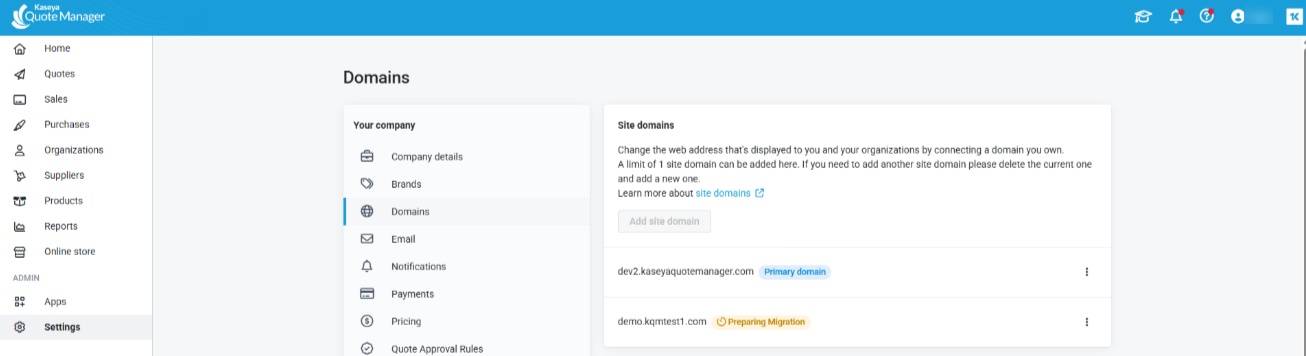
Kaseya temporarily routes your tenant to a default KQM URL (for example, yourtenant.kaseyaquotemanager.com) so that admins can still access the application.
-
Your custom domain is moved off Azure Front Door Classic and registered on Azure Front Door Premium.
-
KQM generates new DNS values (CNAME and/or TXT records) that you must configure with your DNS provider.
-
After you update DNS, you return to KQM and click Validate to complete the migration.
-
On success, your custom domain is reattached, now backed by Azure Front Door Premium.
Your customers may experience temporary unavailability on your custom quote URL if they visit it while you are in the middle of migration and before DNS has fully updated. To minimize impact, plan a maintenance window when traffic is lower.
 How to migrate affected domains
Step 1 – Open the Domains page
-
Sign in to Kaseya Quote Manager as an admin.
-
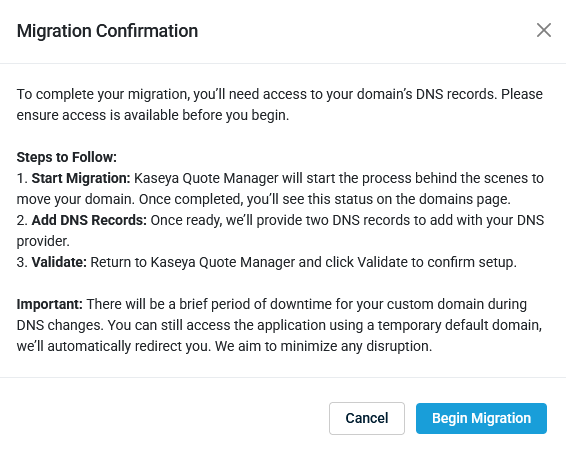
On the Home page, you may see a banner about Azure Front Door migration. Click Get Started. A confirmation dialogue appears.
-
Alternatively, go directly to:
Settings > Domains > Site domains.
-
On the Domains page, you’ll see:
-
A migration banner explaining the change.
-
A table listing your domains and their current status.
Step 2 – Identify domains that must be migrated
On the Domains page:
-
Look for domains marked with a Migration Needed status.
-
These are the domains that must be migrated to Azure Front Door Premium.
Step 3 – Start migration for a domain
For each domain that requires migration:
-
In the domain list, find the domain you want to migrate (for example, quotes.yourcompany.com).
-
Click More (the three dot icon) and then select Migrate Domain for that row.
When you start migration:
-
Kaseya Quote Manager:
-
Temporarily routes your tenant to a default URL (for admin access).
-
Begins moving the domain from Azure Front Door Classic to Premium.
-
-
The domain’s Migration Status changes to something like In progress.
-
You may see a notification confirming that migration has started.
You can continue to work in KQM using the default URL during this time.
Step 4 – Get your new DNS records
Once KQM has registered your domain on Azure Front Door Premium:
-
Return to the Domains page (refresh if needed).
-
In the domain row, you’ll see that the migration status has changed to indicate that DNS setup is required (for example, Waiting for DNS or Ready for validation).
-
Click View DNS instructions, View details, or equivalent.
You’ll see a panel or dialog that shows the records you must add at your DNS provider, typically including:
-
A CNAME record that points your custom domain to an Azure Front Door endpoint.
-
One or more TXT records used to verify ownership of the domain.
Copy these values carefully—you’ll need them in the next step.
Step 5 – Update DNS records at your DNS provider
Sign in to your DNS provider (e.g., GoDaddy, Cloudflare, Azure DNS, etc.), then:
-
Locate the DNS zone for your domain (for example, yourcompany.com).
-
For your KQM custom hostname (for example, quotes.yourcompany.com), add or update the records listed in the KQM Domains page:
-
CNAME:
-
Name/Host: quotes (or your chosen subdomain).
-
Type: CNAME.
-
Value/Target: The CNAME provided by KQM (for example, an Azure Front Door hostname).
-
TXT (if required):
-
Name/Host: Often your root domain or a specific validation label provided in KQM.
-
Type: TXT.
-
Value: The TXT string provided by KQM.
-
-
Save your DNS changes.
DNS changes can take some time to propagate across the internet (often within minutes, but sometimes longer depending on TTL and your provider).
Step 6 – Validate your domain in Kaseya Quote Manager
After you have updated the DNS records and allowed some time for propagation:
-
Return to Settings > Domains in Kaseya Quote Manager.
-
Locate the domain you just updated.
-
Click More (the three dot icon) and select Validate for that domain.
KQM will:
-
Check your DNS records (CNAME and TXT) against the expected values.
-
Confirm that your domain is correctly mapped to Azure Front Door Premium.
If validation is successful:
-
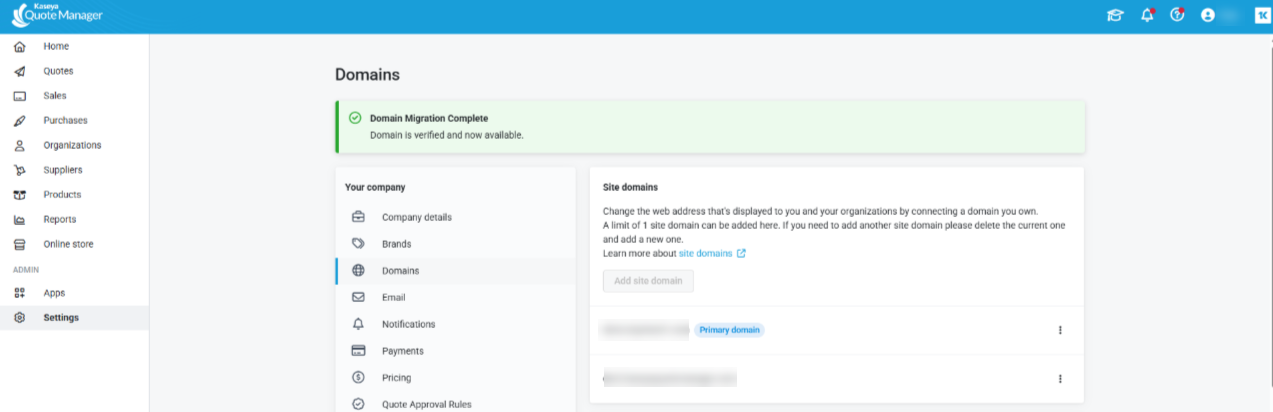
The domain’s migration status changes to complete.
-
Your custom domain is now actively served via Azure Front Door Premium.
-
Any migration banners for that tenant/domain will no longer appear.
If validation fails:
-
KQM will show an error message indicating what needs attention (for example, a TXT or CNAME record not found or incorrect value).
-
Correct the DNS records at your provider, wait for them to propagate, and click Validate again.
Step 7 – Verify access and update bookmarks
After a successful validation:
-
Open your custom domain URL (for example, https://quotes.yourcompany.com) in a browser.
-
Confirm:
-
The site loads successfully.
-
Quote links and customer-facing pages behave as expected.
-
If your internal documentation or bookmarks reference the temporary default KQM URL, update them back to your preferred custom domain.
FAQs
Will my custom URL change?
No. Your custom hostname (for example, quotes.yourcompany.com) stays the same. Only the underlying delivery platform (Azure Front Door Classic → Premium) changes.
Will there be downtime?
-
During migration, your tenant is still accessible via a default KQM URL.
-
Your custom URL may experience a short period of unavailability or inconsistent behavior while:
-
Migration is running, and
-
DNS records are being updated and propagating.
-
To minimize impact, we recommend performing the migration during a planned maintenance window or a low-traffic period.
Can I undo the migration?
Once Azure Front Door Classic is decommissioned, there is no supported way to move back to the old platform. The migration path is designed to be forward-only.
If you encounter issues, you can adjust your DNS records and re-run Validate until your configuration is correct.
What if I manage multiple custom domains?
Repeat the Migrate → Update DNS → Validate steps for each domain listed as requiring migration on the Domains page.


