Advanced fraud detection
To help prevent fraudulent orders, Kaseya Quote Manager supports Stripe protection for online transactions. You can detect and enforce fraud detection via the following indicators:
- IP address location
- order velocity (too many orders from the same IP address or for the same product in the past few hours)
How to...
 Configure Stripe for enhanced fraud protection
BEFORE YOU BEGIN Enable Stripe credit card payments: Connect Stripe to Kaseya Quote Manager
Stripe allows you to write fraud prevention rules specific to your business. Complete the following steps:
- Log in to your Stripe portal.
- In Rules, configure the following blocks:
- risk_level
- CCV verification fail
- Stripe geo-blocking: ZIP code and country verification block
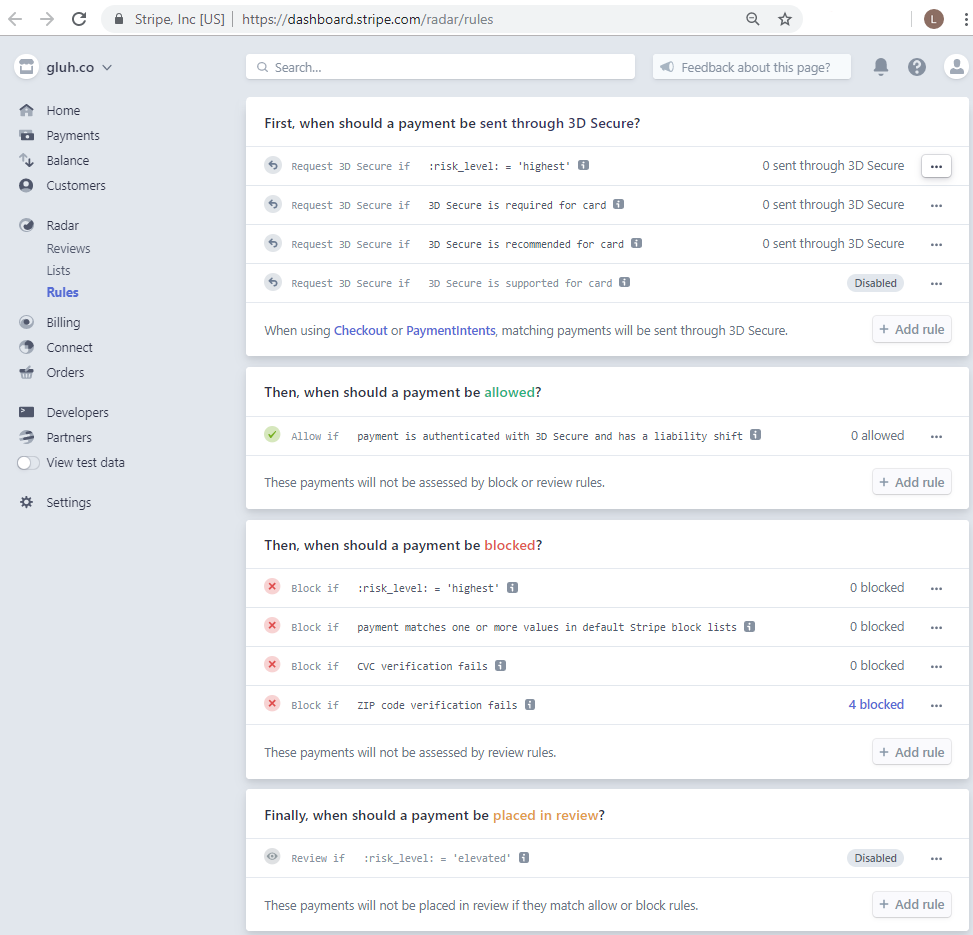
NOTE You can review your rules at any time.
Cancel a fraudulent order
In the event that Stripe notified you of fraud, do not refund the credit card. Stripe will request your bank to revoke the funds.
Cancel the order as follows:
- From the left navigation menu, click Sales
 > Draft.
 - Search for the order you want to cancel and click its Order # to open the sales order.
- In the upper-right corner of the page, click the More icon
 and select Cancel.
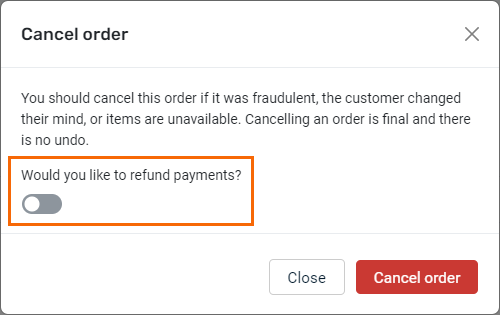
 - Turn off the Would you like to refund payments? toggle.
- Click Cancel order.

Other protections against fraud
- Once you've configured Stripe, check the risk notifications they provide upon sales order approval (with warning for all overseas orders).
- Take care with transactions delivered to any address where no one will be physically present to receive the package. Whenever possible, do not leave orders on a doorstep.
- When it comes to new organizations, we recommend shipping only to business addresses.
- If an order seems suspicious, don't second-guess yourself. Follow your company's fraud prevention protocols.
Restricting website visibility
Kaseya Quote Manager automatically checks the organization's IP address and warns you if the order was placed from an IP outside of your business region.
All orders placed from an overseas IP address require manual approval. Refer to Approving sales orders.
To block the visibility of your website outside of your business region, consider using a third-party script from an IP blocking application, such as Geo Targetly. From the left navigation menu, click Settings  > Preferences and enter the JavaScript code.


