Cooper Copilot
NAVIGATION Left navigation menu > Settings  > Cooper Copilot
PERMISSIONS Standard, Sales, and Purchasing roles cannot have the settings check box selected - only admin users can access settings.
The Cooper Copilot page is a centralized admin interface that allows you to manage all AI-powered features within your Kaseya Quote Manager instance. Adjust your settings at any time.
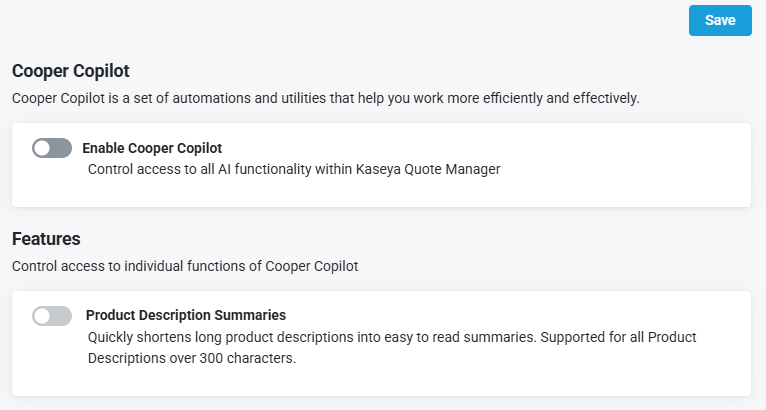
This page provides a single location to enable or disable AI capabilities. The design ensures compliance with EU opt-in requirements and gives administrators full control over AI usage in their environment. The use of any Cooper Copilot features is optional.
 Enabling Cooper Copilot
-
From the left navigation menu, click Settings
> Cooper Copilot. -
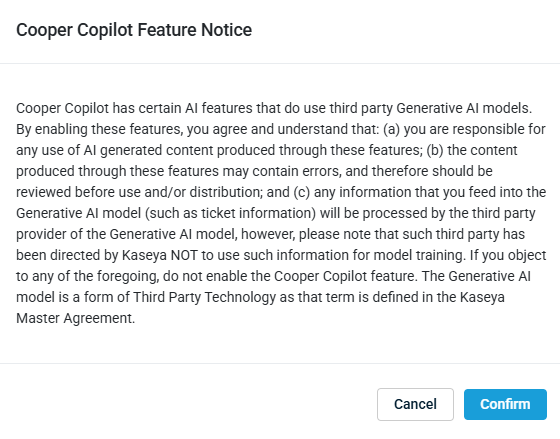
In the Cooper Copilot section, toggle Enable Cooper Copilot. The Cooper Copilot Feature Notice window appears.
-
Select Confirm to continue with the enablement or Cancel to keep disabled.
-
Select Save.
Enabling Product Description Summaries
NOTE Cooper Copilot must be enabled before an individual feature can be turned on. Refer to Enabling Cooper Copilot.
When Product Description Summaries is enabled, Cooper Copilot can efficiently condense lengthy product descriptions into clear, readable summaries for any description exceeding 300 characters.
NOTE Product blocks must have the Show Product Summary option enabled. Refer to Refer to Quoting from the Admin Center.
Once this feature is enabled, it will be available at the quote builder level for each product block.
-
From the left navigation menu, click Settings
> Cooper Copilot. -
In the Features section, toggle Product Description Summaries.
-
Select Save.
Refer to Cooper Copilot and product summaries.


