January 13, 2026
Kaseya Quote Manager Release Notes
The Kaseya Quote Manager (KQM) team is excited to announce the following improvements and/or fixes:
Enhancements
Cooper Copilot AI summaries
You can now use AI to summarize all long service or product descriptions in a quote block with a single click. Instead of summarizing each line item one by one, KQM will automatically create concise, customer‑friendly descriptions for every item that has a long description. Refer to Cooper Copilot.
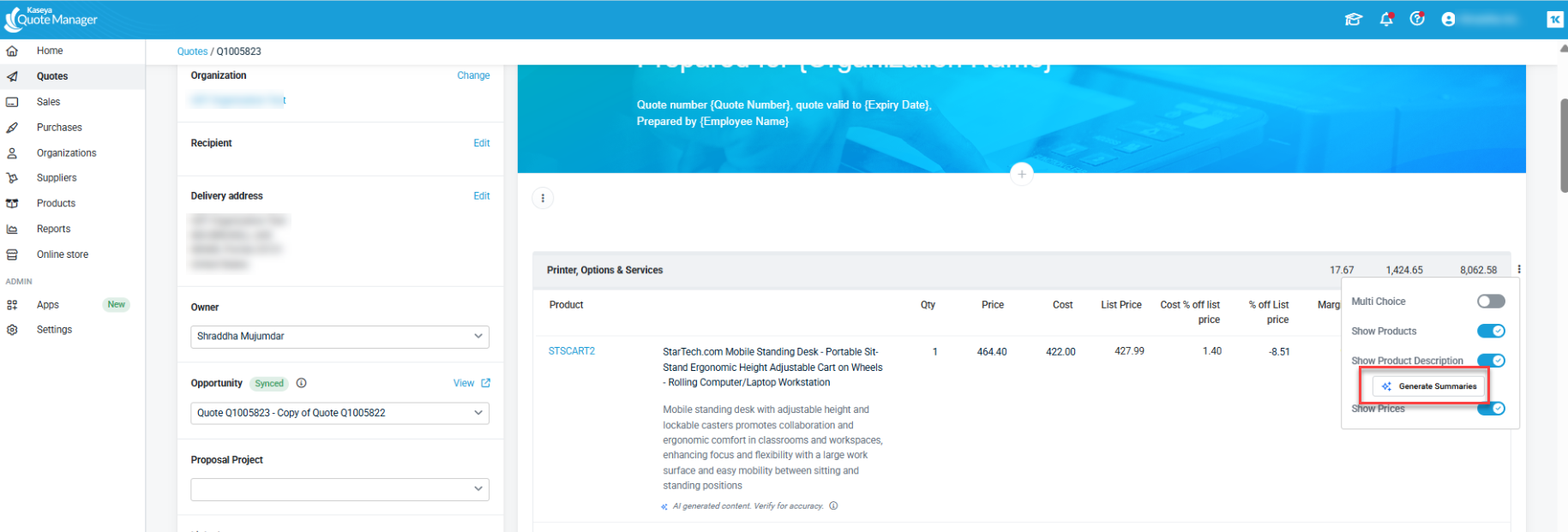
With this feature enabled:
Display descriptions on the quote
-
Optionally show product and service descriptions directly under each line item.
-
Descriptions appear both in the online quote and in printed/exported PDFs, so customers don’t need to click into items to see details.
Use AI to generate concise summaries
-
Click the Generate AI Summary button on any product or service line to create a clear, customer‑friendly description.
-
Long descriptions are automatically summarized to 300 characters or less.
-
Short descriptions (under 300 characters) are shown as‑is without changes.
Edit and fine‑tune before sending
-
AI summaries are fully editable in the quote, allowing you to adjust wording, tone, or add extra details.
-
The AI label and timestamp are visible to your internal users only and do not appear on the customer‑facing PDF.
Keep your quoting flow fast and responsive
-
Summaries generate asynchronously in the background, so you can continue adding items and saving the quote without waiting.
-
A small inline status indicator shows while a summary is being generated, with a retry option if something goes wrong.
Benefit to you and your customers
-
Save time by eliminating manual copy‑and‑paste of product/service descriptions.
-
Deliver quotes that are clearer and more transparent for customers.
-
Maintain control over which line items include descriptions and how they are worded.
-
Ensure printed and exported quotes contain the same helpful information as the online experience.
NOTE This feature is available with summaries containing 300 or more characters.
Fixes
This release addresses minor bug fixes and improvements to the UI experience. These fixes and improvements include, but are not limited to:
-
Fixed an issue that caused incorrect surcharge calculations on quotes that contained a mix of both Amazon and non-Amazon products. For all new quotes, the surcharge on the sales order will be calculated correctly.
-
We’ve optimized and cached key database queries used when loading quotes. This significantly reduces load times, especially for larger or complex quotes.
-
Fixed an issue that caused the second line of an organization's address to be removed when syncing from KQM to Autotask.
-
Fixed an issue where the date displayed on the Customer Quote View did not correctly reflect the customer’s timezone.
-
Resolved an issue where the Decline Quote modal did not correctly reflect the user’s timezone, ensuring consistent date/time information across the UI.
-
Corrected a UI issue that caused column misalignment in the product block on the quote template, improving readability and presentation for customers.
-
Fixed an issue where the AI badge was split into two lines when the Cooper Copilot toggle was disabled in admin settings, ensuring a clean and consistent UI.
-
Resolved an error that occurred when a Purchasing user attempted to generate a product summary on a quote, ensuring AI features are available across appropriate user roles.
-
Fixed a discrepancy where the total value shown on the Sales Order did not match the Stripe transaction total due to differences in shipping charge handling. Totals are now consistent end‑to‑end.
-
Fixed an issue where declined entries in the audit trail were missing IP addresses for all user types, improving traceability and compliance.
-
Addressed a server error that could occur when adding a section to a quote, improving overall stability and reliability.


