26.16
Kaseya Quote Manager release notes
New features
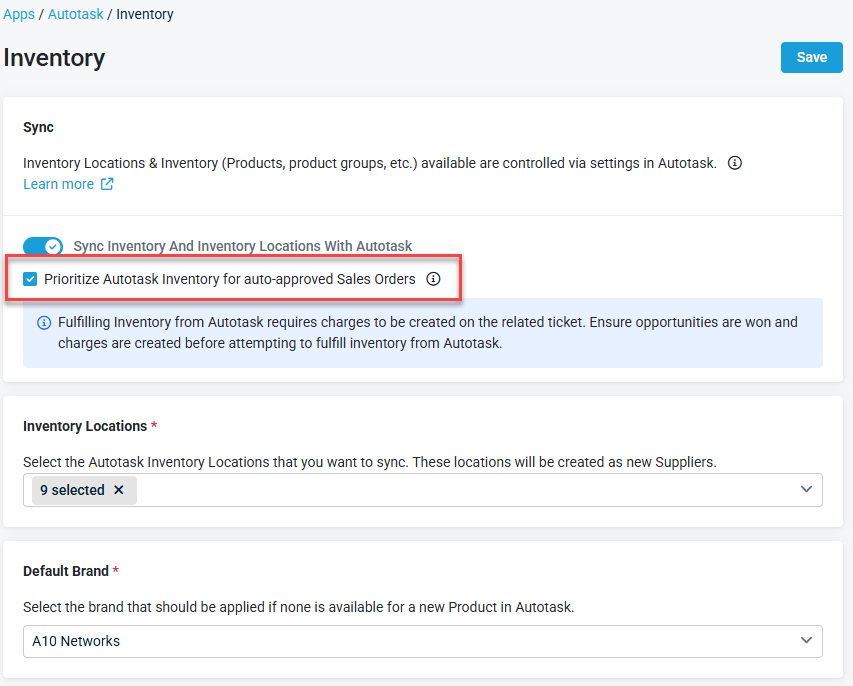
Autotask inventory fulfillment and auto-reservation
We are excited to introduce enhanced inventory fulfillment workflows between Kaseya Quote Manager (KQM) and Autotask PSA. This release streamlines warehouse stock usage and prevents unnecessary vendor purchases by prioritizing on-hand Autotask stock and automating shortfall ordering.
What’s New?
Prioritize Autotask inventory by default
-
Automated line-item tagging: When enabled in integration settings, KQM automatically checks the Pick from Autotask option for all synced line items with available stock on auto-approved sales orders.
-
Controlled procurement: While items are pre-selected for Autotask fulfillment upon order approval, procurement teams retain full control to execute reservations when ready via the Fulfill from Autotask action.
Live inventory and warehouse visibility
-
Hover stock previews: Hover over inventory indicators on any sales order line item to view real-time available quantities, warehouse/location breakdowns, and average unit costs across your Autotask inventory, both before and after order approval.
-
Locked post-approval integrity: Sourcing checkboxes lock upon order approval to prevent accidental mid-fulfillment state changes.
Flexible serial number allocation
-
Automated FIFO assignment (default): Choose automated First-In, First-Out (FIFO) allocation to automatically reserve matching serialized items in Autotask.
-
Manual Serial Selection: Uncheck Auto-Select to launch an interactive selection modal with pagination, keyword search, column sorting (Date Received, Serial Number, Cost), and mismatch validation warnings.
Hybrid sourcing and consolidated shortfall POs
-
Intelligent shortfall purchasing: When Autotask stock does not cover the full ordered quantity, KQM calculates the remaining shortfall.
-
Smart supplier ranking: Automatically recommends the optimal vendor per shortfall line based on stock availability, live ETA/integration status, and configured cost tiers.
-
Consolidated purchase orders: With one click, generate consolidated supplier POs grouped by vendor.
End-to-end status and linked records tracking
-
Sales order progression: Orders update automatically to Partially Fulfilled or Fulfilled based on stock coverage.
-
Direct Autotask linking: Fully fulfilled orders link directly to corresponding Autotask charges and tickets.
-
Linked PO dashboard: View linked supplier POs, status badges, MPNs, and delivery dates directly within the fulfillment view.
Refer to Autotask inventory fulfillment and auto-reservation for more information.
Space validation added to Tracking Number field in fulfillment and receiving flows
The Tracking Number field in the Sales Order manual fulfillment and Purchase Order receiving flows now rejects entries that contain spaces. A validation message appears immediately at the point of entry, preventing you from proceeding with an invalid tracking number that would otherwise redirect to the Aftership homepage instead of the correct tracking page.
New release banner on the main page
A banner now appears on the main landing page whenever a new release is available, giving you quick access to release notes directly from within the application. The banner includes a Learn More link to the Kaseya Quote Manager release notes and can be dismissed; once dismissed, it will not reappear until the next release.
Fixes
-
Products from the Ingram Micro supplier feed that are associated with an existing brand alias and have stock available were not being added to Kaseya Quote Manager. Affected products now appear correctly in the catalog.
-
Marking a quote as Declined removed GST from the quote and did not restore it when the Declined status was removed. GST is now preserved correctly through the Declined and un-Declined workflow.
-
Resolved an issue where record updates during integration syncs (including ConnectWise) failed to persist.


